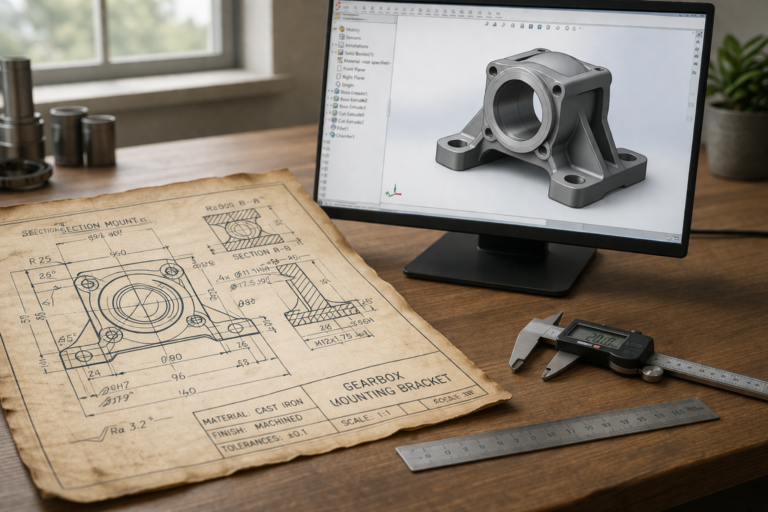
A solidworks modeling service delivers more than just 3D geometry — it delivers parametric design intelligence that survives revision cycles, manufacturing handoffs, and product lifecycle changes spanning years of production. SolidWorks is the dominant parametric CAD platform in mechanical engineering for a reason: its feature-based modeling approach captures not just the shape of your part but the logical relationships between every dimension, fillet, hole pattern, and surface that define how the design behaves when requirements change. This guide covers everything buyers need to evaluate, select, and get maximum value from a professional solidworks 3d modeling provider.
What a Solidworks Modeling Service Includes
A comprehensive solidworks part modeling engagement delivers four core work products. First, native SolidWorks part files (SLDPRT) containing fully defined parametric sketches with all geometry constrained by dimensions and geometric relations — no underdefined blue lines, no floating geometry, no unconstrained points that shift unpredictably when you modify an unrelated dimension. Second, assembly files (SLDASM) when multiple components interact, with proper mate definitions that reflect real-world physical contacts, clearances, and motion limits. Third, 2D technical drawings (SLDDRW) exported to PDF for visual reference and DWG for manufacturers using AutoCAD-based workflows, with proper dimensioning, tolerances, and GD&T callouts where functional requirements demand them. Fourth, neutral format exports — STEP for vendor-independent file sharing and STL for 3D printing — so your files work with any downstream tool or manufacturing partner regardless of their CAD platform.
Higher-tier solidworks assembly service engagements add finite element analysis (FEA) for stress, thermal, and vibration simulation, motion studies for mechanism validation with real-world physics, photorealistic rendering using SolidWorks Visualize for marketing and investor materials, and formal design-for-manufacturing (DFM) reviews documenting draft angles, wall uniformity, undercut locations, and tooling considerations for your target production process. These extras carry premium pricing that is justified when the project genuinely requires them — a safety-critical structural bracket needs FEA, a decorative cover plate does not.
Solidworks Part Modeling — Quality Standards That Matter
The feature tree is the single most important quality indicator in any SolidWorks part file. A professionally modeled part follows a logical, readable feature sequence: base sketch establishing the primary profile, primary extrusion creating the core solid shape, secondary features adding functional geometry (bosses, ribs, pockets, through-holes), cosmetic and structural refinements (fillets, chamfers), and finally manufacturing-specific operations (draft, shell, rib patterns). Each feature should be named descriptively — Boss-Main-Body, Cut-USB-Port, Fillet-Edge-R3, Shell-1.5mm — so any engineer who opens the file months or years later can understand the design intent without reading documentation or contacting the original designer.
Fully defined sketches are a non-negotiable quality standard for professional solidworks 3d modeling. Every line, arc, circle, and spline must be constrained with a combination of dimensional values and geometric relations (coincident, tangent, parallel, perpendicular, concentric). Underdefined geometry — indicated by blue lines and points in SolidWorks — is the primary cause of models that break catastrophically when you change a single dimension. A properly constrained model updates predictably and reliably across any modification, which is the entire point of parametric design. If your provider delivers files with underdefined sketches, they are not providing parametric modeling — they are providing direct editing with a parametric wrapper, and the files will cause problems the first time you need a revision.
Design intent documentation goes beyond feature naming. Proper solidworks part modeling uses global variables for repeated dimensions (a consistent fillet radius applied across 30 edges defined in one place and referenced everywhere), equations linking related dimensions (a pocket depth calculated as wall thickness minus 0.5 mm clearance), and configuration tables for product families where the same base geometry produces multiple variants through dimension changes alone. These techniques make the model a living engineering document, not a static geometric snapshot.

Solidworks Assembly Service — Multi-Component Projects
Assembly modeling introduces complexity layers that single-part work does not encounter. Each component must be individually modeled with proper datum references, then brought together in an assembly environment where physical contacts, clearance gaps, motion ranges, and fastener compatibility are verified through SolidWorks mate definitions and interference detection tools. A professional solidworks assembly service checks every assembled configuration for physical collisions, verifies that moving parts clear static structures throughout their entire range of motion, and confirms that standard hardware (screws, nuts, bearings, springs) fits correctly with proper clearance and engagement depth.
The assembly file also serves as the basis for exploded view drawings used in assembly instructions, bill-of-materials generation for procurement, and section views that reveal internal component relationships for manufacturing and quality inspection teams. A well-structured assembly uses sub-assemblies to organize related components (the hinge sub-assembly containing pin, bushing, and leaf components) rather than dumping all parts into a single flat assembly — an organizational approach that mirrors real-world manufacturing assembly sequences and makes the file manageable as component count grows beyond 15 or 20 parts.
For clients who source components from multiple suppliers, our assembly files include reference geometry showing the envelope space each component occupies, clearance zones that must remain empty for thermal expansion or assembly tool access, and datum structures that align with the client’s manufacturing fixturing strategy. These details are invisible in a rendered marketing image but critical for successful physical production. The SolidWorks official documentation provides detailed tutorials on assembly best practices that align with the workflow we follow for every multi-component project.
Why Parametric Modeling Service Quality Matters Long-Term
A parametric model is an investment that pays dividends across the entire product lifecycle. Version one ships with 2.0 mm wall thickness. Six months later, field testing reveals that 2.5 mm is needed for durability in cold climates. In a properly built parametric model, that change takes 30 seconds — modify the shell thickness value, rebuild, re-export STEP and STL, and send updated files to the manufacturer. In a poorly built model with hard-coded geometry, the same change might break 15 downstream features, requiring hours of manual repair or a complete model rebuild at full project cost.
The cost difference is staggering over a multi-year product lifecycle. A product that goes through 8 revision cycles (typical for consumer electronics and consumer products) with a clean parametric model costs roughly $200 to $400 in cumulative revision fees. The same product with a poorly built model costs $1,500 to $3,000 because each revision requires partial or complete reconstruction. Investing in quality parametric modeling service work upfront is the single highest-ROI decision most product companies make during development — yet it is also the most commonly undervalued, because the cost of poor quality is invisible until the first revision cycle reveals it.
Pricing for SolidWorks Modeling Services
Single-part projects with moderate geometric complexity cost $34 to $69 and deliver within 24 hours. Multi-part assemblies containing 5 to 15 components range from $120 to $500 depending on interaction complexity and documentation requirements. Complex products with 20+ components, motion mechanisms, and full production drawing packages run $500 to $2,000 or more, with timelines of 2 to 4 weeks that include structured revision cycles and manufacturing review checkpoints.
Hourly billing for open-ended solidworks modeling service engagements ranges from $25 to $75 depending on the provider’s geographic location and depth of specialization. Monthly retainer agreements at 10 to 20 percent below standard project rates suit companies with continuous design needs — new product variants, packaging updates, manufacturing change orders, and ongoing engineering support throughout the production lifecycle. Our retainer clients at minicad.io benefit from a dedicated engineer who accumulates deep knowledge of their product line, manufacturing partners, and design preferences over time, eliminating the ramp-up cost that occurs with every new project when working with a different provider.
How to Evaluate a Provider Before Committing
Request a feature tree screenshot from a past project similar to your own. The tree should be clean, logically ordered, and fully named. Request a dimensioned drawing to verify proper GD&T application. Ask about their revision process — how many rounds are included, how feedback is structured, and what happens when an error originates from the provider versus from an ambiguous client brief. A provider who answers these questions confidently and specifically has established processes. One who deflects or gives vague answers is improvising.
Check review volume and recency. A provider with 4,470+ verified reviews and a 4.9-star rating has been tested by the market across thousands of unique projects spanning diverse industries, complexity levels, and client communication styles. That volume of validated experience cannot be faked, bought, or replicated by a new entrant with a polished website and no delivery history. Recent reviews (past 30 to 90 days) confirm that current quality matches historical performance — teams change, and quality three years ago does not guarantee quality today.
What Your File Delivery Should Include
Every solidworks modeling service delivery should include the following items as standard, without premium pricing or negotiation: native SLDPRT files for all parts, SLDASM files for assemblies, SLDDRW files for drawings, STEP exports for manufacturer compatibility, STL exports at specified mesh resolution for 3D printing, PDF exports of all drawings for quick visual reference, and a revision log documenting what changed from any prior version. If any of these items are presented as premium add-ons or charged separately, the provider is padding the invoice with deliverables that represent baseline professional practice in the industry.
Our file delivery standard at minicad.io includes all items listed above plus print orientation notes for any STL file, material recommendations based on the part’s functional requirements, and a brief design rationale document for complex projects explaining key engineering decisions. This documentation package means your files are not just geometrically correct — they carry the engineering context that makes them useful to downstream manufacturing teams, quality inspectors, and future designers who may modify the design years after the original project concludes.
Industry Specialization and Its Impact on Deliverable Quality
A solidworks modeling service that specializes in consumer electronics enclosures approaches a medical device housing differently than a generalist who treats every project the same. Consumer electronics prioritize aesthetic surfaces, snap-fit assembly for tool-free user access, and compliance with FCC/CE electromagnetic shielding requirements that affect enclosure geometry (conductive coatings, gasket grooves, continuous metal contact at seam lines). Medical devices prioritize biocompatibility-certified materials, sterilization-compatible geometry (no crevices that trap contaminants), and documentation trails that satisfy FDA design control requirements under 21 CFR Part 820.
Automotive components carry yet another specialization layer — tolerance standards aligned with IATF 16949, material certifications including PPAP (Production Part Approval Process) documentation, and environmental testing requirements (thermal cycling, salt spray, UV exposure, vibration) that impose specific geometric constraints on features like snap-fits, seals, and mounting interfaces. A solidworks 3d modeling provider who has delivered 500+ projects in your industry vertical already understands these requirements and applies them automatically. A generalist requires education during your project — billable hours spent teaching your designer what they should already know.
Our studio’s project portfolio at minicad.io spans consumer electronics, kitchen and home products, industrial enclosures, outdoor equipment housings, medical instrument cases, and automotive accessories. This cross-industry breadth gives us pattern recognition that pure specialists lack — we can apply a thermal management solution proven in industrial electronics to a consumer product enclosure, or adapt an automotive vibration-resistant mounting concept to a marine electronics housing. Cross-pollination of proven design patterns across industries produces better solutions than staying within a single vertical silo.
Communication and Feedback Workflow for Large Projects
For solidworks assembly service projects involving 10 or more components, unstructured email communication breaks down quickly. Feedback gets scattered across threads, revision instructions conflict between messages, and both parties lose track of which components have been approved and which still need changes. We use a structured milestone approach: components are grouped into logical sub-assemblies, each sub-assembly is reviewed and approved independently, and the final assembly integration happens only after all sub-assemblies are individually verified.
Feedback at each milestone follows a standardized format — annotated screenshots with color-coded markups (green for approved features, red for changes needed, blue for questions), a numbered list of specific requested modifications with exact dimensional values, and a clear approval or revision decision for the sub-assembly as a whole. This structure reduces a typical 20-component project from 8 to 10 unstructured revision exchanges down to 3 to 4 structured milestone reviews, saving both calendar time and total engineering hours while producing cleaner, better-documented final deliverables.
Common Mistakes Clients Make When Outsourcing SolidWorks Work
The most expensive mistake is providing vague requirements and expecting the designer to fill gaps correctly. Every unspecified dimension becomes a coin flip. Every undefined tolerance becomes a default assumption. Every missing functional description becomes a guess about how the part interacts with its environment. Investing 30 minutes in a clear, dimensioned brief with material preferences, manufacturing method, and functional descriptions of mating interfaces eliminates two to three revision cycles and saves a week of back-and-forth communication that delays your timeline and consumes budget without advancing the design.
The second most costly mistake is selecting providers based solely on the lowest quoted price without evaluating parametric modeling quality through feature tree review, sketch constraint verification, and drawing accuracy checks. A $15 part model that requires $200 in revision work to fix parametric errors costs more than a $69 model delivered correctly on the first pass. Ask for evidence of quality before committing — any confident provider will share sample feature trees and drawings from past projects without hesitation because their work product speaks for itself.
The Long-Term Value of Professional Parametric Files
A SolidWorks model is not a one-time deliverable — it is a living engineering asset that generates value across the entire product lifecycle. When a customer requests a product modification 18 months after initial delivery, a clean parametric model with named features and fully defined sketches allows your engineer (or ours, if you return for follow-up work) to make the change in minutes rather than hours. When your manufacturer identifies a production optimization that requires a 0.5 mm dimension change on a mating surface, the parametric model propagates that change through every dependent feature automatically — fillets update, hole patterns shift, mating clearances adjust — without manual rework on each affected feature.
This lifecycle value compounds with every revision cycle. A product that goes through 8 design iterations over 3 years (typical for consumer electronics and consumer products) with well-structured parametric files costs roughly $200 to $400 in cumulative revision engineering time. The same product with poorly structured files — underdefined sketches, unnamed features, hard-coded dimensions instead of global variables — costs $1,500 to $3,000 in cumulative revision time because each change requires partial model reconstruction rather than simple parameter adjustment. The difference between these two cost trajectories is entirely determined by the quality of the original solidworks modeling service work — a decision made at the start of the project that echoes financially through every subsequent year of the product’s production life.
Choosing a parametric modeling service provider based on initial project cost alone ignores the lifecycle cost equation that actually determines total engineering expenditure. A $34 model that breaks on first revision and requires $200 in rebuild work costs more than a $69 model that handles 10 revision cycles cleanly with $15 of engineering time per change. The quality difference is invisible at delivery — both models look correct on screen — but becomes starkly apparent the first time anyone tries to modify a single dimension and watches half the feature tree turn red with rebuild errors.
Explore real examples of this work in our portfolio — see our custom brackets and mounts in SolidWorks and custom PCB enclosure project box projects. Need professional engineering support? Our outsource CAD design service and technical drawing service deliver production-ready files in 24 hours.
Start Your SolidWorks Project Today
Professional solidworks modeling service work is an investment in design quality that pays returns across every revision cycle, manufacturing handoff, and product update for the entire lifecycle of your product. With 7,000+ projects delivered across 40+ countries, a 4.9-star rating from 4,470+ verified reviews, and 24-hour delivery on most single-part jobs, our engineering team at minicad.io delivers the parametric quality, file documentation depth, and manufacturing awareness that serious product development demands. Get a free quote and experience what professional SolidWorks modeling should feel like — precise, well-documented, and built to last.