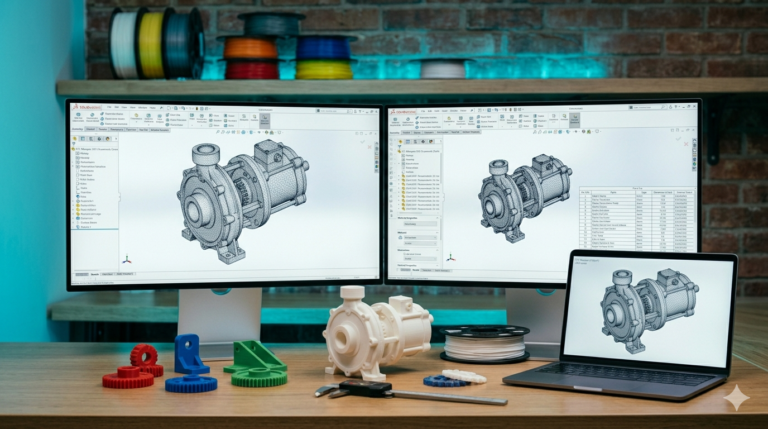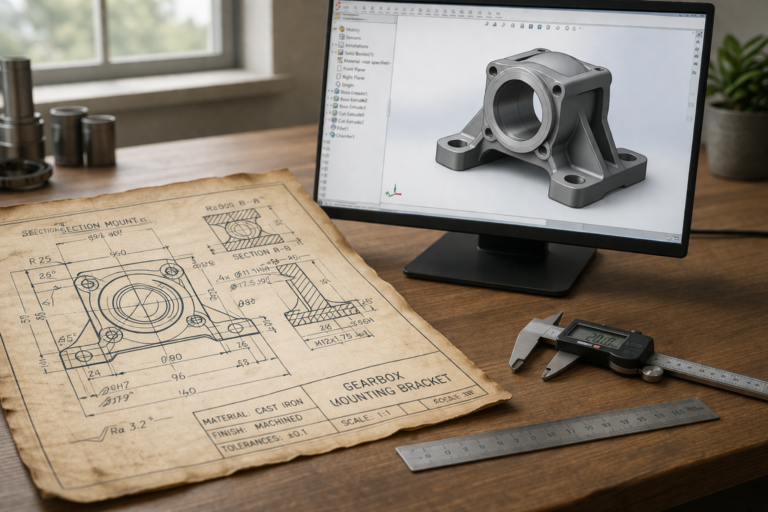
SolidWorks has dominated the professional mechanical product design market for more than three decades because its parametric modeling engine captures not just geometry but the engineering intelligence behind every design decision. Understanding 3d modeling solidworks at a professional level means understanding feature trees, sketch constraints, assembly mates, sheet metal tools, surfacing techniques, and the simulation capabilities that transform SolidWorks from a drawing tool into a genuinely complete end-to-end product development platform. This comprehensive guide covers everything a prospective buyer, product developer, or aspiring engineer needs to know about SolidWorks-based 3D modeling — the workflow, the deliverables, the quality benchmarks, and the critical practical considerations that determine whether a SolidWorks model serves your project for years or becomes a frustrating and expensive headache at the very first revision attempt.
Why 3D Modeling in SolidWorks Dominates Product Engineering
SolidWorks holds over 3.5 million active commercial licenses worldwide — more than any competing mechanical CAD platform. This installed base creates a network effect: manufacturers, service bureaus, and engineering partners expect SLDPRT and SLDASM files natively, STEP exports from SolidWorks maintain full geometric fidelity without translation artifacts, and the global available talent pool of experienced and verified SolidWorks engineers vastly exceeds that of any alternative platform. When you commission 3d modeling solidworks work, the resulting files integrate seamlessly into the established global manufacturing ecosystem without compatibility friction, format conversion overhead, or vendor-side import troubleshooting that delays production timelines and creates engineering communication friction between your design team and manufacturing partners.
The technical advantage is parametric associativity — every dimension, geometric relation, and feature in the model is logically linked to every other dependent element. Change one hole diameter and the clearance pocket in the mating part, the callout on the drawing, and the BOM annotation all update automatically. This associativity is not a convenience feature; it is the engineering foundation that makes revision cycles fast, accurate, and free of the cascading manual update errors that non-parametric modeling tools inevitably produce when designs change — which every real-world design does, repeatedly, throughout its development and production lifecycle.
Alternative platforms exist for specific niches. Autodesk Fusion 360 offers accessible cloud-based modeling suitable for individual designers and hobbyists. CATIA serves aerospace and automotive companies where Class A surfacing complexity exceeds SolidWorks’ native capabilities. Inventor competes in the same mid-market mechanical space but with a smaller installed base and fewer third-party integration partners. NX handles the largest-scale assemblies in the aerospace and defense sectors. For the vast majority of consumer products, industrial equipment, medical devices, and general mechanical engineering projects, SolidWorks delivers the optimal combination of capability, compatibility, and talent availability — which is why our studio uses it exclusively for every project we deliver.
The Feature Tree — The Heart of Professional SolidWorks Modeling
Every SolidWorks part model contains a feature tree — a chronological list of every modeling operation applied to create the final geometry. The tree records the sequence: base sketch, primary extrusion, secondary features (bosses, cuts, holes, patterns), refinements (fillets, chamfers, draft), and manufacturing operations (shell, rib, split). A professionally built feature tree reads like an engineering recipe that any competent SolidWorks user can follow, understand, and modify without consulting the original designer or reading external documentation that may not exist.
Feature naming is the clearest quality indicator. Entries like “Boss-Main-Body,” “Cut-USB-Port-Left,” “Fillet-Grip-Edge-R3,” and “Shell-1.5mm-Interior” communicate design intent explicitly. Generic entries like “Boss-Extrude47” and “Cut-Extrude12” indicate a designer who builds geometry quickly but documents nothing — creating files that work today but become impenetrable maintenance burdens when anyone (including the original designer) tries to modify them six months later. Every 3d modeling solidworks file our studio delivers uses descriptive feature naming as a non-negotiable quality standard because the 30 seconds per feature spent naming during creation saves hours of reverse-engineering effort during every future modification.
Fully defined sketches — where every line, arc, circle, and spline is constrained by dimensions and geometric relations with zero underdefined (blue) geometry — are equally critical. An underdefined sketch is a time bomb in the feature tree: it works fine when created but moves unpredictably when any upstream dimension changes, cascading errors through every downstream feature. A single underdefined point in a base sketch can break 40 dependent features when a seemingly unrelated dimension is modified — a catastrophe that takes hours to diagnose, repair, and verify — consuming engineering budget on model maintenance rather than design advancement. Professional parametric modeling eliminates this risk entirely through complete sketch definition at every level of the feature tree.

Part Modeling Techniques for Production-Ready Geometry
Professional SolidWorks part modeling follows a logical sequence that builds geometric complexity incrementally while maintaining parametric integrity at every step. The base feature establishes the primary volumetric shape — typically an extruded or revolved profile that captures the overall form factor. Secondary features add functional geometry: mounting bosses, connector cutouts, ventilation patterns, cable routing channels, and structural ribs. Each secondary feature references either the base geometry or a stable reference plane rather than other secondary features — minimizing the dependency chain length and reducing the probability that modifying one feature breaks others downstream.
Manufacturing-specific features come last in the tree: draft angles for injection molding applied after all functional geometry is complete, shell operations for uniform wall thickness applied after ribs and bosses are positioned, and fillet operations softening sharp edges applied as the final geometric step before drawing creation. This sequencing is deliberate — manufacturing features depend on the functional geometry they modify, so placing them at the tree bottom ensures they update correctly when functional features above them change during revision cycles. Reversing this order (applying fillets before adding ribs, for example) creates dependency conflicts that corrupt the tree when modifications propagate through incorrectly ordered operations.
Global variables and equations elevate SolidWorks modeling from competent to expert level. A consistent fillet radius used across 30 edges should be defined once as a global variable (e.g., “R_Fillet_Grip = 3 mm”) and referenced at every fillet feature — not typed as “3” at each individual location. When the design review changes the fillet to 4 mm, a single variable edit updates all 30 instances simultaneously. Similarly, a pocket depth calculated as “Wall_Thickness – 0.5 mm clearance” should be an equation in the feature, not a manually calculated hard-coded number. Equations maintain logical relationships between dimensions that survive revision cycles. Hard-coded numbers lose their relationship context the moment they are entered and become latent errors waiting to manifest when the value they were derived from changes without the dependent value being manually updated in parallel.

Assembly Modeling — Making Parts Work Together
SolidWorks assemblies bring individually modeled parts into a shared environment where physical contacts, clearance gaps, motion ranges, and fastener engagement depths are verified through mate definitions. Standard mates (coincident, parallel, perpendicular, concentric, distance, angle) constrain component positions relative to each other. Advanced mates (width, path, linear coupler, rack-and-pinion) simulate mechanical relationships between moving parts. The assembly environment provides interference detection (checking whether any solid bodies overlap physically), clearance verification (confirming minimum gaps between non-contacting components), and motion studies that animate mechanisms through their full range of travel to verify that moving parts clear static structures throughout the complete actuation cycle.
Professional assembly modeling uses sub-assemblies to organize related components into logical groups that mirror the manufacturing assembly sequence. A hinge sub-assembly containing pin, bushing, and two leaf components can be inserted into the main assembly as a single unit — simplifying the top-level assembly structure, reducing mate count, and improving rebuild performance on large assemblies with 50 or more total components. Top-level assemblies should reference sub-assemblies rather than individual parts wherever a group of components functions as a discrete unit during manufacturing, assembly, or servicing operations. This organizational discipline is invisible in a rendered marketing image but absolutely critical for file maintainability during multi-year product lifecycles, manufacturing documentation accuracy when drawings are generated from assembly structures, and BOM generation clarity when procurement teams use the assembly BOM as their purchase order source. Companies that skip sub-assembly organization during initial modeling spend 3 to 5 times more engineering hours on assembly file maintenance, drawing regeneration, and BOM correction during the production phase compared to companies that invest the upfront time in proper assembly architecture.
Simulation and Analysis Within SolidWorks
SolidWorks Simulation (included in Professional and Premium licenses) provides finite element analysis (FEA) for stress, strain, displacement, thermal distribution, frequency response, and buckling analysis directly within the modeling environment — without exporting geometry to a separate analysis platform. Static stress analysis applies specified loads and boundary conditions to the meshed geometry and calculates von Mises stress distribution, maximum displacement, and minimum safety factor. Thermal analysis models heat conduction, convection, and radiation to predict temperature gradients across the part under steady-state or transient thermal loading conditions.
The practical value of integrated simulation is rapid design iteration — change a wall thickness, rebuild the model, and re-run the stress analysis in minutes to verify that the modification maintains the required safety factor. External FEA packages (ANSYS, Abaqus, COMSOL) provide more advanced analysis capabilities for specialized applications (nonlinear contact, fluid-structure interaction, electromagnetic simulation), but for the standard stress, thermal, and vibration analyses that most mechanical product designs require, SolidWorks Simulation delivers results that are accurate, fast, and directly linked to the parametric model — which means simulation results update automatically when the geometry changes during design iteration, eliminating the re-import, re-mesh, and re-apply-boundary-conditions cycle that external FEA packages require after every model modification. For iterative design optimization where engineers test 5 to 10 geometric variants against the same load case, this integrated approach saves hours of analysis setup time per iteration cycle — time that compounds rapidly across complex projects with dozens of analysis-driven design decisions.

Technical Drawing Generation from SolidWorks Models
SolidWorks Drawing (SLDDRW) creates fully associative 2D technical documentation from 3D models. Standard views (front, side, top, isometric), section views (revealing internal features), detail views (magnifying small critical areas), and broken views (showing long parts at reduced scale) are all generated automatically from the 3D geometry and update instantly when the model changes. Dimensions placed on drawings reference the model’s parametric dimensions — modify the 3D model and every drawing dimension updates to reflect the new geometry without manual redimensioning.
Professional drawings include GD&T fundamentals reference callouts that communicate geometric controls (flatness, cylindricity, perpendicularity, true position) in the universal language that machine shops and quality inspection facilities worldwide understand. Our 3d modeling solidworks deliveries always include dimensioned technical drawings as standard output — not as a premium add-on — because a 3D model without documentation is only half the engineering deliverable. The manufacturer needs the model for CAM programming. The quality inspector needs the drawing for dimensional verification. Both are essential for production success, and both should be standard deliverables from any professional SolidWorks design provider.
Sheet Metal and Weldment Modeling in SolidWorks
SolidWorks provides dedicated sheet metal tools that go far beyond simply drawing flat shapes and adding bend lines. The sheet metal environment uses base flanges, edge flanges, miter flanges, hem features, and forming tools that automatically maintain proper bend radius, K-factor calculations, and flat pattern geometry throughout the modeling process. Every bend, tab, and flange in a sheet metal model automatically generates an accurate flat pattern for laser cutting or water jet cutting — including bend deduction calculations that account for material stretching at the bend zone so the finished folded part measures correctly at every dimension.
The K-factor — the ratio of the neutral axis position to the material thickness within the bend — is the critical parameter that determines flat pattern accuracy. For mild steel at 1.5 mm thickness, a K-factor of 0.44 produces accurate flat patterns for standard press brake tooling. For aluminum at 1.0 mm, 0.40 is more appropriate. SolidWorks stores K-factor values in bend tables that can be customized per material, per thickness, and per tooling radius — meaning a single part model automatically generates correct flat patterns for any combination of material and manufacturing equipment by selecting the appropriate bend table rather than manually recalculating bend deductions for each configuration.
Weldment modeling in SolidWorks handles structural frames, supports, and fabricated assemblies built from standard structural profiles (square tube, rectangular tube, angle, channel, I-beam). The designer selects profiles from a library (or creates custom profiles), routes them along 3D sketch paths, and SolidWorks automatically generates the individual cut members with proper miter joints, trim operations, and a cut list that serves as the fabrication shop’s production order — listing every member by length, profile type, and quantity. This 3d modeling solidworks capability transforms what would be a complex multi-body modeling exercise in other CAD platforms into a streamlined workflow purpose-built for fabricated steel and aluminum structures.
Rendering and Visualization Directly in SolidWorks
SolidWorks Visualize (included with Professional and Premium licenses) produces photorealistic rendered images directly from the parametric model without exporting to a separate rendering application. Physically-based materials, HDR environment lighting, and camera simulation create images that are indistinguishable from studio photography — useful for product marketing, investor presentations, and Amazon listing imagery before any physical sample exists. The rendering workflow is associative: modify the 3D model, and the rendered scene updates automatically without re-importing geometry or re-applying materials and lighting from scratch.
For clients who need rendered marketing images alongside their engineering deliverables, integrated rendering eliminates the hand-off friction that occurs when CAD files are exported to a separate visualization pipeline operated by a different team or vendor. Our studio produces rendered imagery directly from the same SolidWorks model that generates manufacturing documentation — ensuring that the product shown in marketing images is geometrically identical to the product the manufacturer will produce, with zero risk of the visual-engineering disconnect that occurs when marketing renders and production models diverge during parallel independent revision cycles.
How to Evaluate 3D Modeling SolidWorks Quality Before Committing
Request a feature tree screenshot from a completed project. Named features in logical sequence with zero suppressed errors indicate professional parametric discipline. Request a dimensioned drawing to verify proper GD&T application. Ask about the designer’s SolidWorks version and CSWA/CSWP certification status — certified professionals have demonstrated proficiency through standardized testing administered by Dassault Systèmes. Check review volume: a provider with 4,470+ verified reviews and a 4.9-star rating has been market-tested across thousands of projects in ways no interview, test project, or portfolio review can replicate — because sustained market-level quality under real production conditions over thousands of engagements is a fundamentally different achievement than performing well on a single carefully prepared evaluation task in a controlled assessment context.
Explore real examples of this work in our portfolio — see our custom 3D printed storage container and 2D technical drawing for manufacturing projects. Need professional engineering support? Our SolidWorks modeling service and STL file design service deliver production-ready files in 24 hours.
Get Professional SolidWorks Models in 24 Hours
Whether you need a single part modeled from a sketch or a 50-component assembly with simulation, drawings, and production documentation, professional 3d modeling solidworks work delivers the parametric quality, manufacturing awareness, and documentation depth that successful products require across their entire lifecycle. With 7,000+ projects delivered, a 4.9-star rating from 4,470+ verified reviews, and 24-hour delivery on most single-part jobs, our team at minicad.io delivers SolidWorks excellence. Get a free quote today.